
If your SASSA SRD status check shows Declined, you have the legal right to submit a SASSA SRD appeal. A decline does not mean your grant is gone forever — it means SASSA’s monthly means test found something that disqualified you for that specific month. This complete guide walks you through the entire sassa status check appeal process for 2026, from submitting your appeal at srd.sassa.gov.za to checking your srd appeal status check result.
What Is a SASSA SRD Appeal?
A SASSA appeal — officially called an ITSAA appeal (Independent Tribunal for Social Assistance Appeals) — is your legal right to challenge a declined SRD R370 grant application. The appeal is governed by the Social Assistance Act 13 of 2004, which gives every South African the right to dispute a SASSA decision they believe is incorrect.
SASSA runs a monthly means test to ensure your total income does not exceed the strict R624 threshold. This test checks your ID number against SARS, UIF, NSFAS, and banking records. Even if you qualified last month, a single data discrepancy can trigger a decline. Most declines can be successfully appealed — especially if SASSA’s records are wrong or if you received a once-off payment that triggered the means test incorrectly.
Important to Know
Each declined month is a separate appeal. If you were declined in May and June, you must submit two separate appeals — one for each month. You cannot appeal multiple months in a single submission.
The 90-Day Deadline — Everything You Need to Know
The most critical thing about the sassa status check appeal date is the 90-day window. You have exactly 90 calendar days from the date of the decline to submit your appeal. After 90 days, SASSA will not accept your appeal, and the opportunity to recover that month’s payment is permanently lost.
90-Day Deadline — Do Not Miss It
The 90 days counts from the decline date — not from the date you discovered the decline. Check your status at srd.sassa.gov.za to find the exact decline date, then count 90 days from there. Submit yoursrd appealimmediately if you are close to the deadline.
Can You Appeal Multiple Months at Once?
No. Each declined month requires a separate srd status check appeal. If you were declined for 3 consecutive months, you must submit 3 separate appeals through the official SASSA SRD portal. The portal will show you each month that is available for appeal based on your decline history.
What Happens If You Miss the 90-Day Deadline?
Unfortunately, once the 90-day window closes, SASSA will not process the appeal and that month’s payment cannot be recovered. There is no extension process. This is why checking your SASSA status check regularly — ideally at the start of every month — is so important.
How to Submit a SASSA Appeal Online — Step by Step
The SASSA appeal online process is done entirely through the official SRD portal at srd.sassa.gov.za. You will need your 13-digit South African ID number and the phone number registered on your SASSA application.
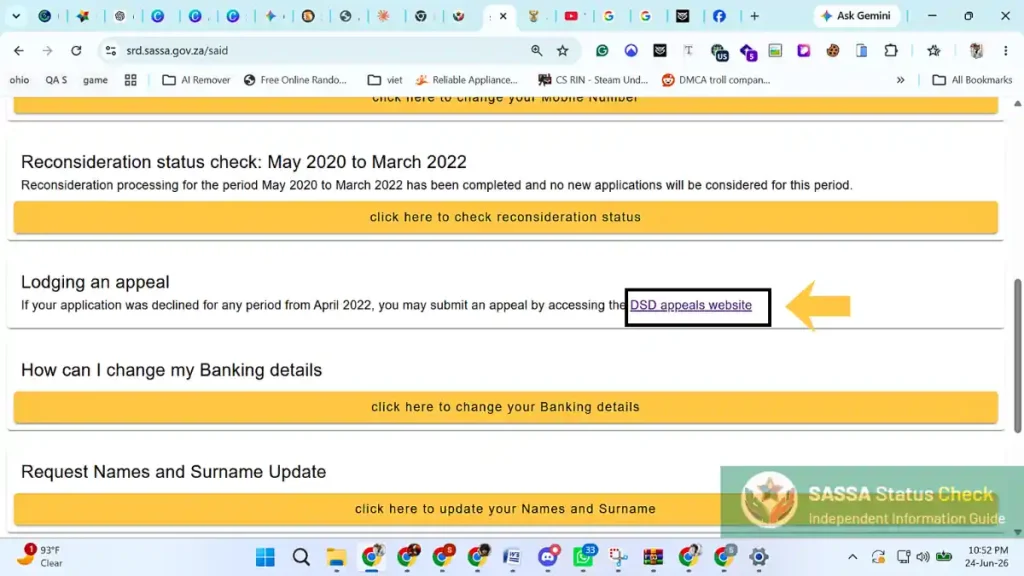
1. Go to the Official SASSA Appeal Page
Open your browser and go to srd.sassa.gov.za. Look for the “Appeal” section in the navigation menu. The direct URL is typically srd.sassa.gov.za/appeals. Never use a third-party site — only the official .gov.za portal accepts real appeals.
2. Enter Your 13-Digit South African ID Number
Type your ID number carefully in the first field. Double-check every digit. A single wrong number will bring up the wrong record and your appeal will fail validation.
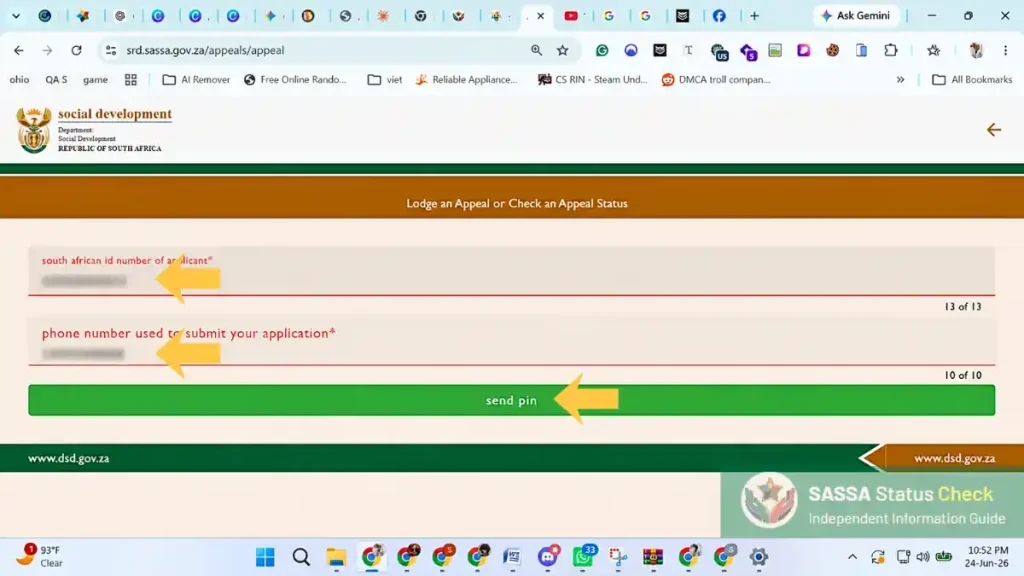
3. Enter Your Registered Phone Number and Verify via OTP
Enter the 10-digit phone number registered on your SRD application. SASSA will send a one-time PIN (OTP) to this number. Enter the OTP to verify your identity. If you no longer have access to this number, you must first change your SASSA phone number before submitting an appeal.
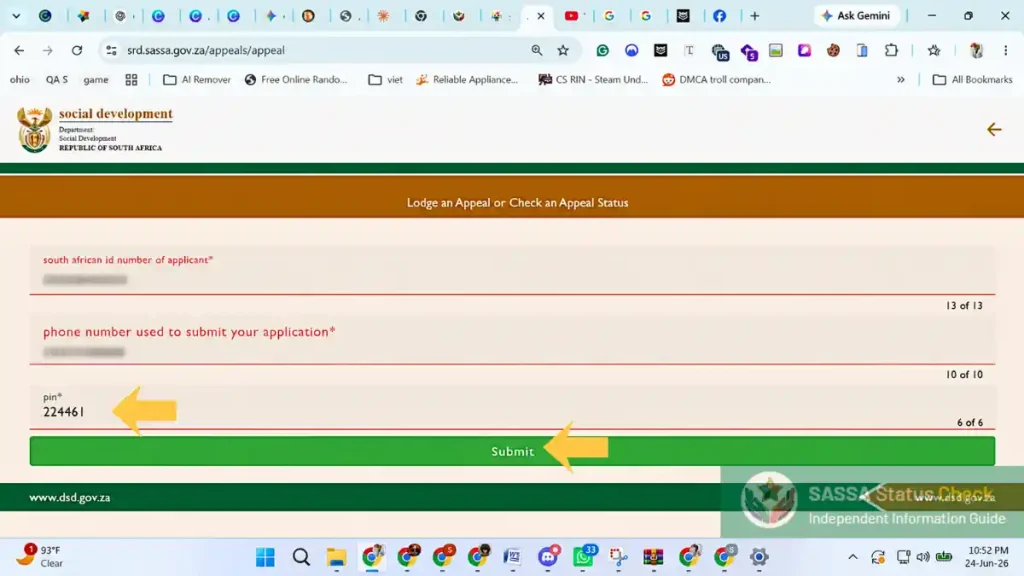
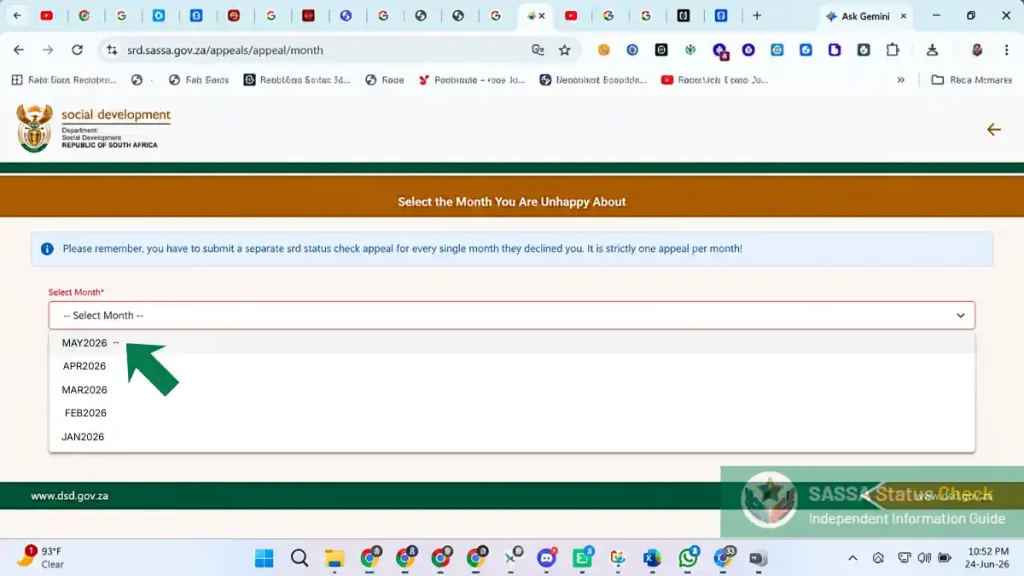
4. Select the Month You Are Appealing
The portal will show you a list of months where your status was “Declined” and the 90-day window is still open. Select the specific month you want to appeal. You can only appeal one month per submission — repeat this process for each declined month separately.
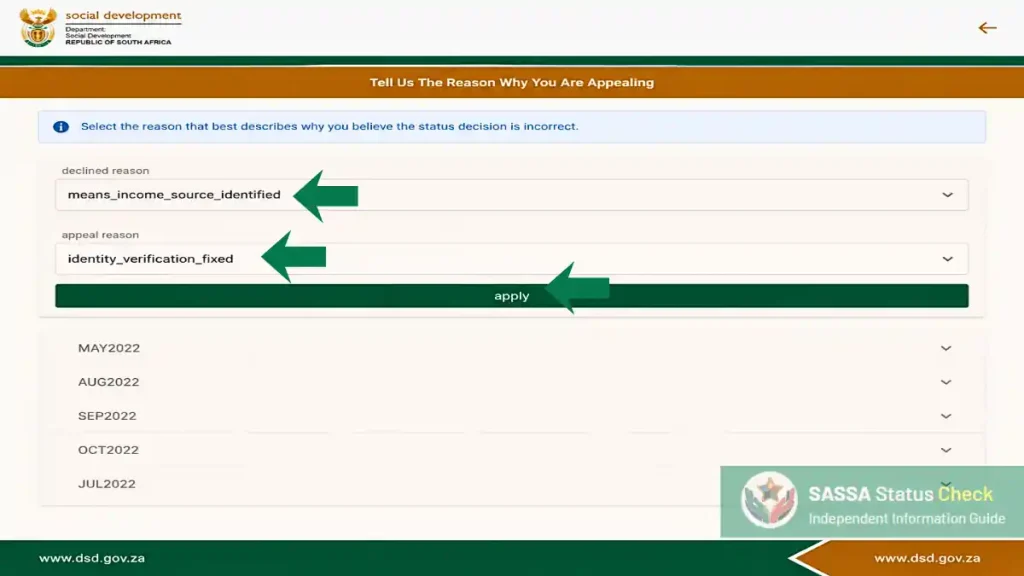
5. Enter Your Reason for Appealing
In the text field, clearly explain why you believe the decline was incorrect. Be specific and factual. For example: “I was declined for Alternative Income Source Identified, but the R800 deposit on [date] was a loan from my sister, not income. I have attached my bank statement confirming this.”
6. Upload Supporting Documents (If Required)
Depending on your decline reason, you may need to upload supporting documents such as a bank statement, letter of resignation, or affidavit. See the documents table in Section 4 below for exactly what each decline reason requires.
7. Submit and Save Your Confirmation Reference
Click Submit. A confirmation reference number will be displayed — screenshot this or write it down immediately. You will need it to track your srd appeal status check. SASSA should also send an SMS confirmation to your registered number.
Documents Required for Each Decline Reason
This is one of the most important parts of your SASSA SRD appeal. Submitting the wrong documents — or no documents — is the most common reason appeals fail. Use this table to find exactly what you need for your specific decline reason.
| Decline Reason | Documents to Upload | Tips |
|---|---|---|
| Alternative Income Source Identified | 3-month bank statement + written explanation of deposits | Explain every deposit above R370 — loans, gifts, once-off payments |
| Identity Verification Failed | Copy of ID document (front and back) | Complete the live biometric facial verification link sent by Home Affairs via SMS. If online verification fails repeatedly, visit a SASSA office. |
| UIF Registered | Letter of resignation / termination letter + UIF letter showing you are no longer contributing | If you left your job, get the UIF status letter from the Department of Labour |
| NSFAS Registered | Letter from NSFAS confirming you are no longer funded, or proof of deregistration | Contact NSFAS directly for an official status letter |
| Government Employee / IPR5 | Termination letter / resignation letter from government employer | Must be on official letterhead with employer details |
| Existing Grant Detected | Proof that you no longer receive the other grant, or SASSA letter | Contact SASSA at 0800 601 011 to get this confirmed in writing |
How to Check Your SASSA Appeal Status
After submitting your appeal, you can track your srd appeal status check through the same official SASSA portal. Many people search for their sassa appeal status check separately — but it is done at the same URL: srd.sassa.gov.za.
Go to srd.sassa.gov.za and enter your ID number and registered phone number as normal. Your appeal result will appear alongside your regular status result once ITSAA has processed it. Check back every 7–10 days after submitting your appeal.
What Each Appeal Status Result Means
✅ Appeal Approved
Your Appeal Was Successful
ITSAA reviewed your case and found that you were incorrectly declined. The payment for that month will be added to your next available payment batch. You should receive an SMS notification. No further action is needed — just wait for payment.
⏳ Appeal Pending
Your Appeal Is Being Reviewed
ITSAA has received your appeal and it is under review. This is the normal status after submission. Do NOT resubmit — one appeal per month is the limit. ITSAA has up to 60 business days to process appeals. Check back in 7–14 days.
❌ Appeal Dismissed
Your Appeal Was Not Successful
ITSAA reviewed your case and upheld SASSA’s original decision. This can happen if the supporting documents were insufficient or if the decline reason was accurately applied. You can escalate to the High Court, or recheck your eligibility for subsequent months and reapply.
📋 Under Review
ITSAA Is Processing Your Case
Your appeal has been assigned to a ITSAA reviewer and is being actively assessed. This is different from “Pending” — it means a human reviewer is looking at your specific case. Allow additional time for this to resolve.
How Long Does a SASSA Appeal Take?
The Independent Tribunal for Social Assistance Appeals (ITSAA) has 60 business days from the date of appeal submission to make a decision. In practice, many appeals are resolved in 30–45 business days, but some take the full 60 days, especially during high-volume periods at the start and end of grant cycles.
📞 If Your Appeal Takes Longer Than 60 Business Days
- Call the SASSA toll-free helpline: 0800 601 011
- Quote your appeal confirmation reference number
- Ask to be transferred to the ITSAA appeals department
- ITSAA contact: 012 338 7462
Tips to Improve Your SASSA Appeal Success Rate
Always Include a Bank Statement
Even if your decline reason is not “Income Source Identified,” a recent 3-month bank statement is helpful in almost every appeal. It shows SASSA exactly what your financial situation is and proves you have no regular income above R370 per month.
Be Specific in Your Written Explanation
Generic explanations like “I am unemployed” are less effective than specific ones. Instead, write: “I was declined for income source identified. The deposit of R1,200 on 15 April 2026 was a loan from my brother Sipho, not employment income. My bank statement reference shows this was a once-off transfer.” The more specific, the better.
Submit Your Appeal Immediately After the Decline
Do not wait. The sooner you submit the appeal, the sooner ITSAA can process it — and the more time you have within the 90-day window if any documentation issues arise. Waiting reduces your options.
Never Pay Anyone to Submit an Appeal for You
The SASSA appeal process is completely free. Any person or website charging you a fee to “submit your appeal faster” or “guarantee approval” is running a scam. Report them to SASSA at 0800 601 011 or to the SAPS.
Phone Number Updates & 2026 RICA Security Rules
If you have lost access to your registered phone number, or if your network provider recycled your SIM card, you will not be able to receive the OTP required to submit your appeal. Under the strict 2025 and 2026 RICA security rules, updating your SRD contact details now requires biometric verification to prevent fraud.
How to safely change your phone number: When you request a number change on the SRD portal, SASSA will escalate the query and send a verification link from the Department of Home Affairs via SMS. You must click this link and perform a live biometric verification (taking a clear selfie) that matches your identity photo. Ensure your new SIM is RICA-registered in your own name before starting. Here’s a guide on Sassa Phone Number Change.
Frequently Asked Questions
How do I check my SASSA appeal status?
Go to srd.sassa.gov.za and enter your 13-digit ID number and registered phone number — the same way you do a regular status check. Your appeal result will appear alongside your monthly status once ITSAA has reviewed it. Check every 7–10 days after submission.
How long do I have to appeal a declined SASSA application?
You have 90 calendar days from the date of the decline for each specific month. After 90 days, the appeal window closes permanently for that month and the payment cannot be recovered. Submit your appeal as soon as you see the Declined status.
Can I appeal if I was declined 3 months ago?
Yes — as long as you are still within the 90-day window for each of those months. For example, if you were declined in April 2026, your deadline is around 3 July 2026. Check the exact decline date on the SRD portal and count 90 days from there. Submit separate appeals for each month.
If my SASSA appeal is approved, when do I get paid?
Once your appeal is approved, the payment for that month is added to your next payment batch. This usually takes 5–10 working days after the approval is confirmed. You will receive an SMS when payment is processed. The money goes to your registered bank account or payment method.
How many times can I appeal?
You can submit one appeal per declined month. If that appeal is dismissed, you cannot appeal the same month again. However, you can appeal every declined month separately — so if you were declined for 6 months, you can submit 6 separate appeals (one per month, within 90 days of each decline).
What is the srd.sassa.gov.za appeal link?
The official SASSA appeal portal is at srd.sassa.gov.za. Navigate to the “Appeal” or “Appeals” section from the main menu. Never use a third-party site that claims to submit appeals on your behalf — these are unofficial and may be scams.
Can I appeal at a SASSA office instead of online?
SASSA strongly recommends the online portal at srd.sassa.gov.za for SRD R370 appeals. However, if you cannot access the internet, you can visit your nearest SASSA office and ask a SASSA official to assist you with the online appeal submission. Bring your ID document and registered phone.
What does “Appeal Dismissed” mean — what can I do next?
A dismissed appeal means ITSAA upheld SASSA’s original decision for that month. You cannot appeal that same month again. Your options are: (1) Accept the outcome and continue checking your status for subsequent months; (2) In exceptional cases, you can take the matter to the High Court — speak to a legal aid office for assistance with this.